Reduce AI agent token costs with better harness design
Lugman Hussain Khan
When teams look at what an AI agent costs to run, they usually start with the model. The harness around it, the software that manages the model’s tools, context, and task execution, gets far less attention, even though it can matter just as much.
A recent study from Arena, HarnessTax, makes this concrete. Across seven models and three coding harnesses, switching harnesses barely changed success rates but could change cost by up to five times. Claude Fable 5 solved 97.8% of attempts in Claude Code and 96.7% in Pi, yet the Claude Code runs cost about twice as much. Much of that gap began before the model did any work: Claude Code’s initial context was more than ten times larger than Pi’s, mostly from longer instructions and larger tool schemas. The authors call this extra spending a harness tax, and it is easy to miss when success rate is the only metric being tracked.
The lesson applies well beyond coding agents. Every turn re-sends the context to the model, so whatever the harness places in that context, and however many turns it makes the model take, is paid for again and again over a session. A well-designed harness absorbs predictable work so the model can focus its reasoning where it is useful. The rest of this post covers the harness decisions that reduce that tax without lowering the quality of the results.
Start with a lean context
Everything placed in the prompt at the start of a session is sent again on every turn that follows. A long system prompt, a large set of tool definitions, and detailed instructions for every possible task all add to the cost of each turn, even when the current task needs none of them. The system prompt should stay concise and the agent should be given only the tools its use case actually requires.
Large instructions that are useful only occasionally should be disclosed progressively instead of being loaded upfront. Skills are a good way to do this. A skill packages guidance for a specific kind of task, and at the start of a session the model sees only its name and a short description. The full instructions load only when the model decides the skill is relevant, so a large library of skills costs little until one of them is needed.
Tool design
Tools are how the model interacts with its environment, and their design shapes how much effort each action takes.
Bundled workflows
When a sequence of steps always happens in the same order, the model does not need to perform each step as a separate tool call. Every call is a turn, and every turn re-sends the full context. A single tool that performs the whole sequence removes those turns entirely, and the model only reasons about the final result.
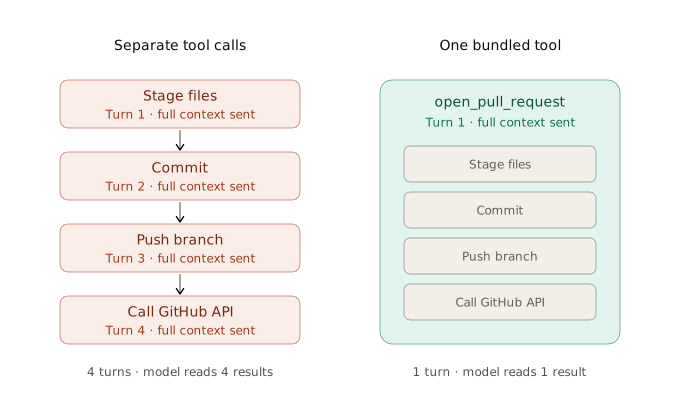
Consider an agent that opens pull requests. Without a bundled tool, it stages files, commits, pushes the branch, and calls the GitHub API, reading a result after each one. With a single tool that opens the pull request, the same work happens in one call.
Capped and clean tool outputs
Tool outputs stay in the context for the rest of the session, which means a long output is paid for on every turn that follows it. A well designed tool returns only what the model is likely to need.
Proper tool errors
A vague error forces the model to guess what went wrong. It retries with small variations until something works, and each attempt costs a full turn. An error that states what was expected and what was received usually lets the model fix the problem on the first attempt.
Tool execution
Once the model knows what to do, the next question is how much of the execution it needs to watch. Every tool result the model reads is carried into later turns, and every step it supervises individually usually costs a turn of its own. The two approaches below reduce that supervision in different ways.
Parallel tool calling
Many actions in an agent’s work do not depend on each other. Reading several files, running the build alongside the tests, or checking multiple services can all happen at the same time. When the model issues these as separate turns, the full context is re-sent for each one. When it issues them together in a single turn, the results arrive together and the model reads them in one pass.
Most models support parallel tool calls, but many do not use them consistently unless they are encouraged to. The system prompt plays an important role here. Unreal Agent’s prompt, for instance, explains to the model that every turn re-sends the whole conversation and asks it to issue independent commands together instead of chaining them across turns.
The defining property of parallel tool calling is that the model still reads every result. This is the right approach when those results inform what the model should do next.
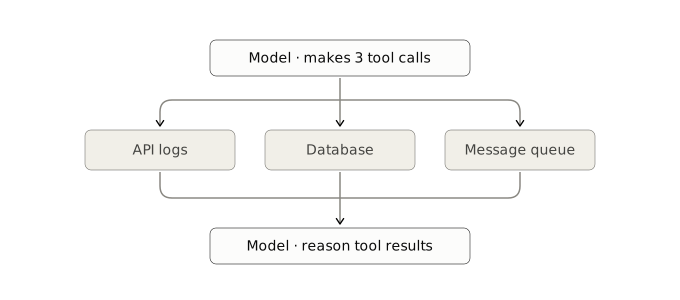
Consider an agent investigating a production incident. Instead of checking the API logs, then the database, then the message queue across three separate turns, it requests all three at once. It reads them side by side, notices a timeout in the database logs, and moves directly to the likely cause.
Code mode for tool execution
Parallel calls help when the model needs to see the results. In many workflows, though, the intermediate results only matter to the outcome and not to the model’s reasoning. Code mode is designed for this case.
In code mode, tools are exposed to the model as functions instead of individual tool calls. The model writes a short program that calls those functions, loops over data, filters it, and passes it from one step to the next. The program runs in a sandbox, and only the final output returns to the model.
The model still composes the workflow on its own, but it does not need to supervise each call within it. Cloudflare introduced the term Code Mode for this pattern, and Anthropic has described a similar approach for MCP servers.
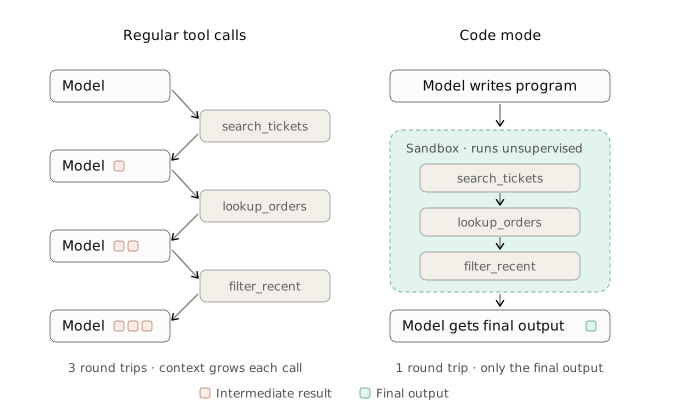
Consider a support agent asked to find every open ticket mentioning a refund, check whether each customer placed an order in the last thirty days, and summarize the ones who did not. With regular tool calls, every ticket and every order lookup passes through the model’s context. In code mode, the model writes a program that performs the search, the lookups, and the filtering in the sandbox, and only the short list of flagged customers comes back for the model to summarize.
Sub-agents with isolated context
Some tasks require a lot of exploration before any useful answer emerges. When the main agent performs that exploration itself, every file it opens and every search result it reads remains in its context for the rest of the session, including the ones that turned out to be irrelevant.
A sub-agent performs that exploration in its own separate context and returns only a concise result to the main agent. The main context stays small, which keeps every later turn in the session cheaper.
This approach needs careful judgment, because it can increase total cost. Sub-agents are most effective when the exploration is noisy and the main session is long enough to benefit from a clean context. For short tasks, they often add overhead without a matching benefit.
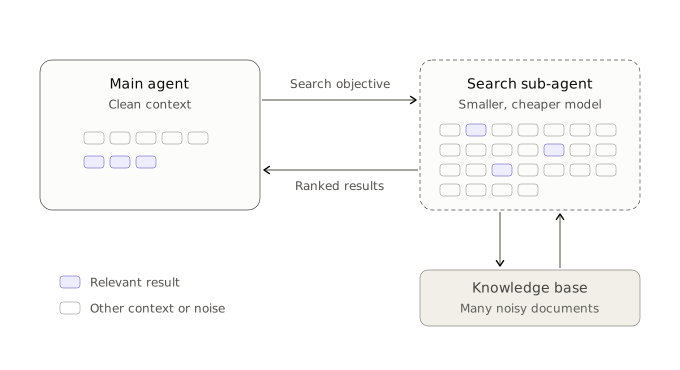
For example, consider a deep search agent answering questions over a large internal knowledge base. Instead of running every search itself, the main agent defines a search objective and delegates the retrieval work to a search sub-agent. When the search is complete, the sub-agent returns a short ranked set of relevant results, and only those enter the main agent’s context. Because the work is bounded and well defined, the sub-agent can often run on a smaller and cheaper model as well.
Keeping the prompt cache intact
The approaches above reduce the number of turns and the number of tokens per turn. Prompt caching reduces the cost of the tokens themselves. Providers bill cached input at a fraction of the normal rate, but only when the beginning of the prompt exactly matches what was sent before. A single change near the top of the prompt means everything after it is billed at the full rate again.
The cache is rarely broken intentionally. It usually happens through ordinary details, such as a timestamp in the system prompt, tool results serialized with keys in a different order each time, tool definitions reordered between turns, or earlier messages edited to shorten them.
Protecting the cache comes down to a few habits. The conversation should be treated as append-only. The system prompt and tool list should remain stable for the entire session. Anything that changes should be placed toward the end of the prompt, and serialization should be deterministic.
Conclusion
The objective is not to make the model do less thinking. It is to make sure the model thinks only where its reasoning creates value, instead of spending turns and tokens on work the harness can handle.
In practice, this means designing tools that absorb predictable work, showing the model only what the current task needs, letting it compose workflows without supervising every step, and protecting the context across the full session. Done well, these choices reduce cost without lowering the quality of the results users experience.