Same models, better margins: AI pricing for SaaS
Arun Karunagaran
In short
- Everyone rents the same models at the same prices. What sets your cost per successful outcome is your engineering, not your provider.
- Cutting your cost per outcome by 30% lets you offer about 43% more work at the same price and margin.
- Credit counts mean little. When we gave three tools the same job, the cost and quality of each finished lead varied widely. Compete on outcomes, not credits.
- Price no lower than your cost and no higher than the value you deliver. Then decide how to use that margin: keep it as profit, pass it on as a lower price, or reinvest it in the product.
- Make bills predictable. Customers who can’t predict their costs start rationing, and get less value from what they pay for.
- Any single optimisation can be copied. The production loop that keeps cutting cost can’t be bought.
You run a SaaS product that sells AI research: $49 a month for 4,000 credits, which customers spend finding companies, identifying decision-makers, verifying emails and drafting outreach. One Monday a competitor launches at $49 with 5,000 credits. You call the same models from the same providers at roughly the same list prices, so matching them would cost most of your margin. How can they afford it? There are four possibilities:
- Their credits buy less. A bigger number can simply mean a smaller credit.
- They’re running a thinner margin, funded by investors, by breakage, or by overage and upgrades.
- They pay less for the same inputs: committed-spend discounts, a better data contract. Real, but it comes with scale.
- They deliver the same outcome for less.
The first is an illusion, the second runs out, and the third comes with a scale you don’t have. The fourth is the only one you can build, and it is what this piece is about: the engineering that lowers your cost per finished outcome, and the pricing choices that turn that into an advantage a competitor can see but not copy.
1. Same pricing model, very different prices
Open the pricing pages of Origami, Apollo and Bitscale, three products that all help sales teams find and reach buyers. One is an agent, one is a data platform, one is a spreadsheet. Their pricing pages are nearly interchangeable: a free tier, a monthly plan with a number of credits in it, and a bigger plan or a top-up when the credits run out.
In Growth Unhinged’s 2026 survey of 230 B2B software companies, this subscription-plus-credits shape became the most common pricing model at 37%, up from 25% a year earlier; 29% of companies already sell AI credits and another 33% plan to within a year.
The number is the only thing that differs, and it means nothing
When every page has the same shape, a buyer’s eye goes to the one thing that varies: how many credits. But a credit is whatever the vendor says it is. Here is what one credit buys at each of the three:
| Origami | Apollo | Bitscale | |
|---|---|---|---|
| What it is | Agent that runs a prospecting play end to end | Sales data platform: seats plus credit pools | Enrichment grid: a spreadsheet where each column is a paid lookup |
| One credit buys | A step of a play; the agent prices each play | One search request or one enrichment attempt | One provider result in one cell |
| Separate credit balances | One | Eleven pools (lead, AI, conversation, dialler, visitor and more) | One |
| A verified email | Charged only when found | 1 credit, found or not | About 1 credit, only on a valid result |
| Research on 20 accounts | 100 credits (5 per account) | 1 credit per search request | About 3 credits per row for deep web research |
| The agent’s own reasoning | Inside the play price | Billed from a separate AI-credit pool | Free |
| Entry plan, per month | $49 for 4,000 credits | $79 per seat for 4,000 credits (billed annually; $94 billed monthly) | $349 for 15,000 credits; free tier of 200 |
Source: vendor sites, October 2026. A credit costs about 1.2¢ at Origami, 2.0¢ at Apollo and 2.3¢ at Bitscale, and buys something different at each.
What one job actually cost
Pricing pages tell you the rules; only a real run tells you the bill. So we gave all three products the same two briefs:
- Brief 1 (India): Find 20 B2B SaaS companies with 50–200 employees that are hiring SDRs. Research each one, find the VP or Head of Sales, and return their verified work email.
- Brief 2 (US): Find 20 B2B SaaS companies with 200–1,000 employees that are hiring Account Executives. Research each one, find the VP or Head of Sales, and return their verified work email.
Full method and results are in the companion benchmark.
| Both briefs, 40 leads asked | Origami ($49 plan) | Apollo (team account) | Bitscale (free tier) |
|---|---|---|---|
| What it meters | The delivered row; price computed per job by the agent (14 credits per lead in India, 9 in the US) and quoted before launch | The attempt: 1 credit per search request, 1 per enrichment, found or not | The column, per row, charged only on a valid result and quoted before each column |
| Usable leads (on-brief, verified email) | 34 (4 in India, 30 in the US) | 21 (6 and 15) | 8 (0 and 8) |
| Share of delivered rows on-brief | 100% | 78% | 64% |
| Credits spent | 326 | 28, including 4 billed misses | 109 |
| Credits per usable lead | 9.6 (about $0.12) | 1.3 (about $0.03 at list) | 13.6 (about $0.32 at the paid rate) |
| Time and human approvals | About 40 min; 9 approvals, including two rounds that delivered nothing and cost nothing | About 3 min; 4 approvals | About 40 min; 12 approvals |
One job, three meters. Apollo was cheapest per lead but left the most filtering to us. Origami cost the most per lead, but every row it delivered met the brief. Bitscale charged fairly per step, but its data sources found no sales leader at 11 of 20 US companies. All three did far better in the US than in India.
The point is not that one vendor is better. A buyer can’t compare these on credits at all, only on what one finished job costs at the quality bar they need. Origami’s $49 plan and Apollo’s $79 seat both include 4,000 credits a month. At the rates we measured, those 4,000 credits buy about 420 usable leads at Origami and about 3,100 at Apollo: seven times as many for 1.6 times the price. Then look at what the buyer had to do: Apollo’s rows were 78% on-brief and we filtered them by hand; Origami’s were 100% on-brief and arrived filtered. Neither number is on either pricing page.
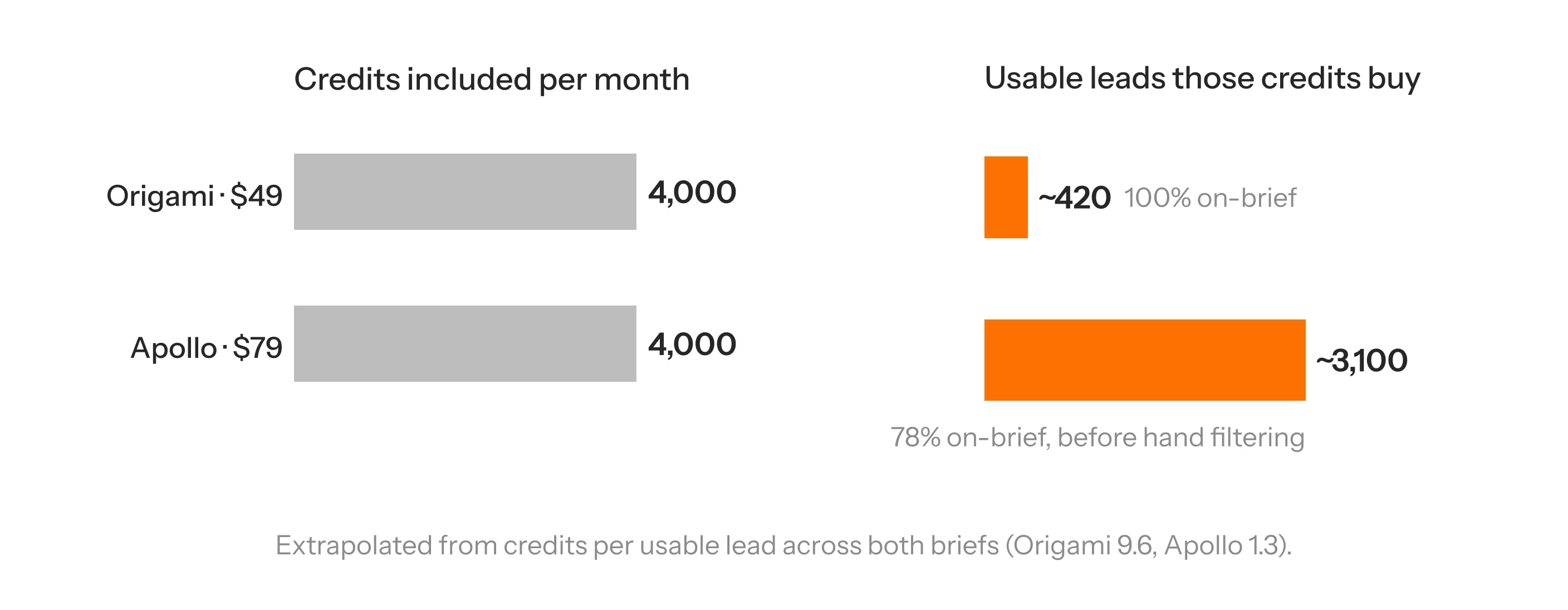
Soon, AI agents will compare software on buyers’ behalf. They will read the fine print in seconds and work out what each plan costs per finished job, so a big credit number won’t impress anyone. You may price in credits, but customers pay for results, and that is what you should compete on.
2. Three numbers to know before you change your price
Your cost per successful outcome. Not cost per call, token or attempt; failed runs and retries cost money too:
Cost per successful outcome = cost of all attempts, including failures and retries ÷ successful outcomes
Define success in the customer’s terms: a verified decision-maker, a ticket resolved without a human, every invoice field correct. On this measure a cheaper model that fails twice as often is the expensive one. And newer isn’t always better at your job: Coinbase tested three upgrades (Opus 4.5 to 5, Sonnet 4.6 to 5, GPT-5.4 to 5.6 Sol) on 16,140 transactions. All three caught less fraud; recall fell 22 points for Sonnet and 21 for GPT.
What that outcome is worth to the customer. Product A gives 200 leads for $49; B gives 150 for $79. If B’s leads convert at three times the rate, B delivers about 40% more pipeline per dollar, and a sales team that does the maths pays the premium. Price the outcome against the work it replaces, and test two plans.
How you compare on the same job. Not pricing pages: the cost of 100 accepted, verified leads at the same quality bar. A product can be more expensive per credit and cheaper per usable outcome.
Your cost per outcome sets your pricing flexibility. The customer’s value per outcome sets your pricing power.
3. Your pricing advantage starts inside the product
If a competitor delivers the same unit of work at 20% lower cost, they can include 25% more at the same price and gross margin (1 ÷ 0.8), or charge less, or keep a fatter margin. None of it needs a better model, only a more efficient use of the same one.
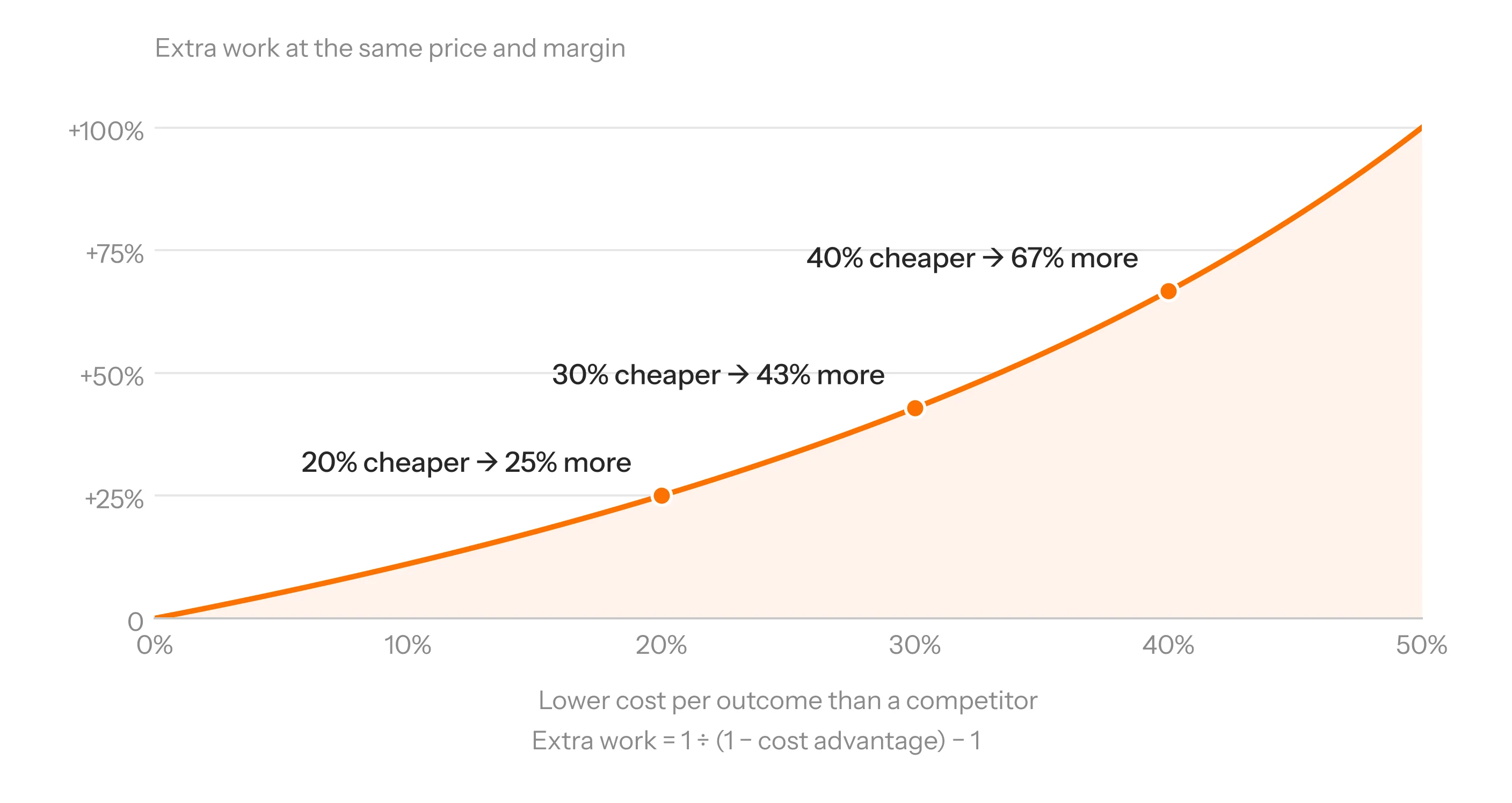
One research task on the customer’s side is dozens of operations on yours: model calls, paid enrichment, retrieval, retries, and the extra tokens from growing context. Almost every line is an engineering decision, and it matters more than in classic SaaS: the survey’s median AI gross-margin target is about 50%, against the 70 to 80% SaaS is used to, and only 12% aim for 80% or more.
Falling model prices won’t do this for you
- Competitors get the same cut on the same day. The gap between an efficient system and a wasteful one stays; only its dollar value shrinks.
- Cheaper tokens don’t fix waste. An agent that takes 40 steps where a competitor’s takes 10 is 4x behind at any token price.
- The price per token isn’t the whole price. Anthropic says Claude Haiku 5.5’s new tokenizer “uses slightly more tokens per task”. My colleague Lugman counted: the same three files and system prompt were 40,762 tokens on Haiku 5.5, 31,279 on Haiku 4.5 (30% more) and 25,855 on GPT-6 Luna. Haiku 5.5 lists at a tenth of Haiku 4.5’s input price; on the same input the real saving is 7.7x. Compare models on what a task costs with your own inputs.
Playing around with the new Claude Haiku 5.5. Looks like Anthropic changed the tokenizer: the same input uses ~30% more tokens than Haiku 4.5.
— Lugman (@lugman_hk) October 8, 2026
4. The engineering behind a cheaper outcome
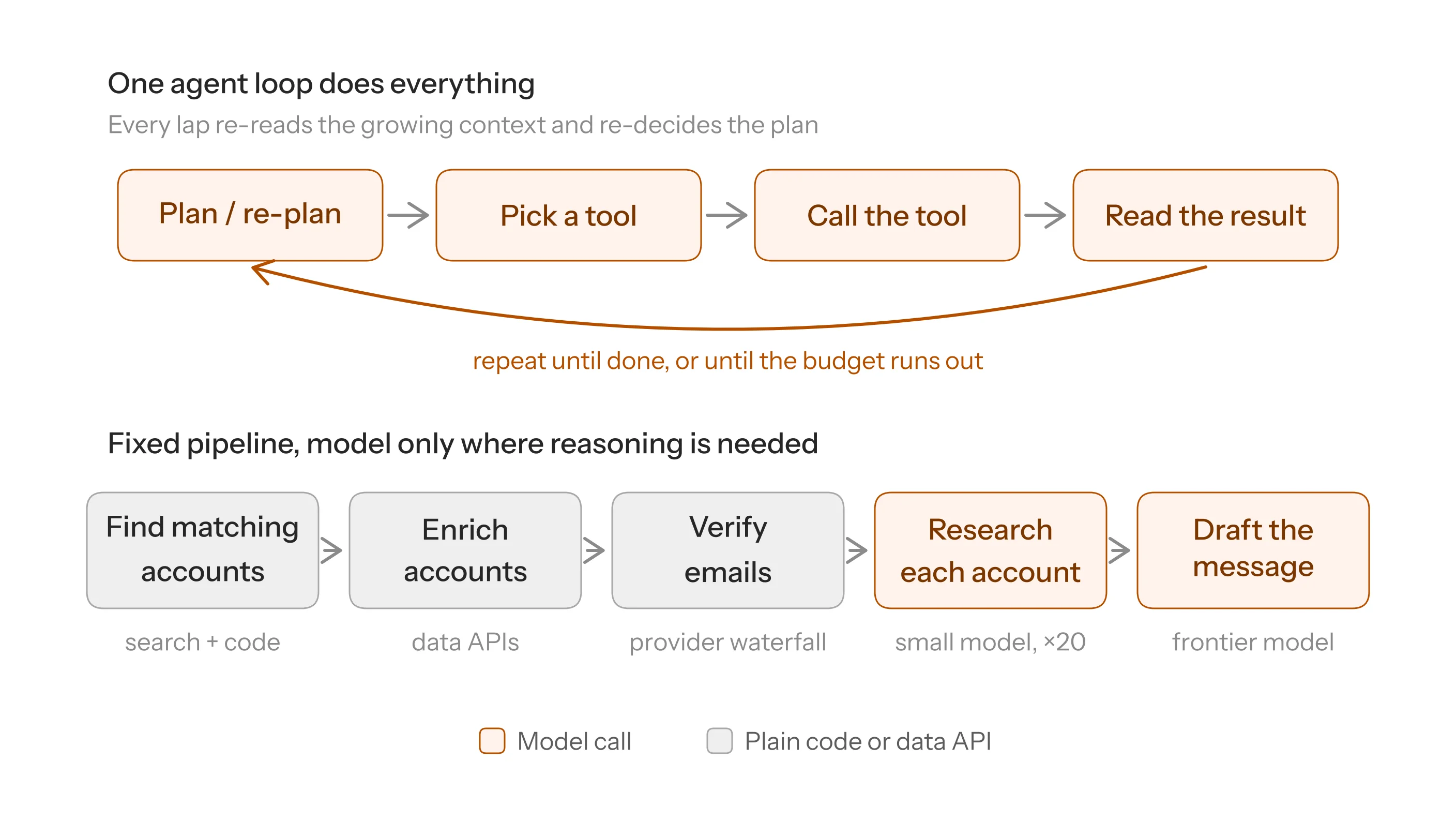
The running example: an agent takes an ideal customer profile, finds 20 matching accounts, researches each, identifies the decision-maker and drafts a first message. Most of what it costs is decided by everything around the model.
4A. Measure cost per successful task, step by step
Build an eval set of 30 to 50 real customer tasks with a clear pass bar. Record cost, success rate and retries per task type, mean and p95, and log every run at the step level so you know what is expensive, not just that it is. A prompt change that improves quality 2% and doubles tokens is a pricing change.
4B. Build a tighter harness
The harness is everything around the model: the loop, the tools, the state, the stopping rules. It’s usually where the waste is.
- Use an agent only where the path is unknown. Finding, enriching and verifying accounts follow the same sequence every time; only researching each account and drafting the message need open-ended reasoning. Building ElectionGPT we chose narrow model calls orchestrated by deterministic code over a fully agentic design; with small open models an agent loop burns iterations deciding what to do next.
- Use code for anything deterministic: deduplication, domain parsing, email patterns, headcount filters.
- Design tools to return less, and have fewer of them. Tool output is re-sent on every later turn: a 15,000-token page returned at turn 3 of a 20-turn run is re-sent 17 times, 255,000 extra input tokens. Return the 300 tokens the agent needs and the run carries 5,100. Every tool definition rides along in every call too.
- Plan once, fan out, fail cheaply. A short plan up front; the 20 accounts researched in parallel sub-agents that each return a short conclusion; schema-constrained outputs, and on failure retry the one step, not the task.
- Set budgets and exits. A maximum number of steps and tokens per task, with a graceful exit that returns partial results. That cap is what makes a fixed price per task safe.
4C. Treat tokens as a budget
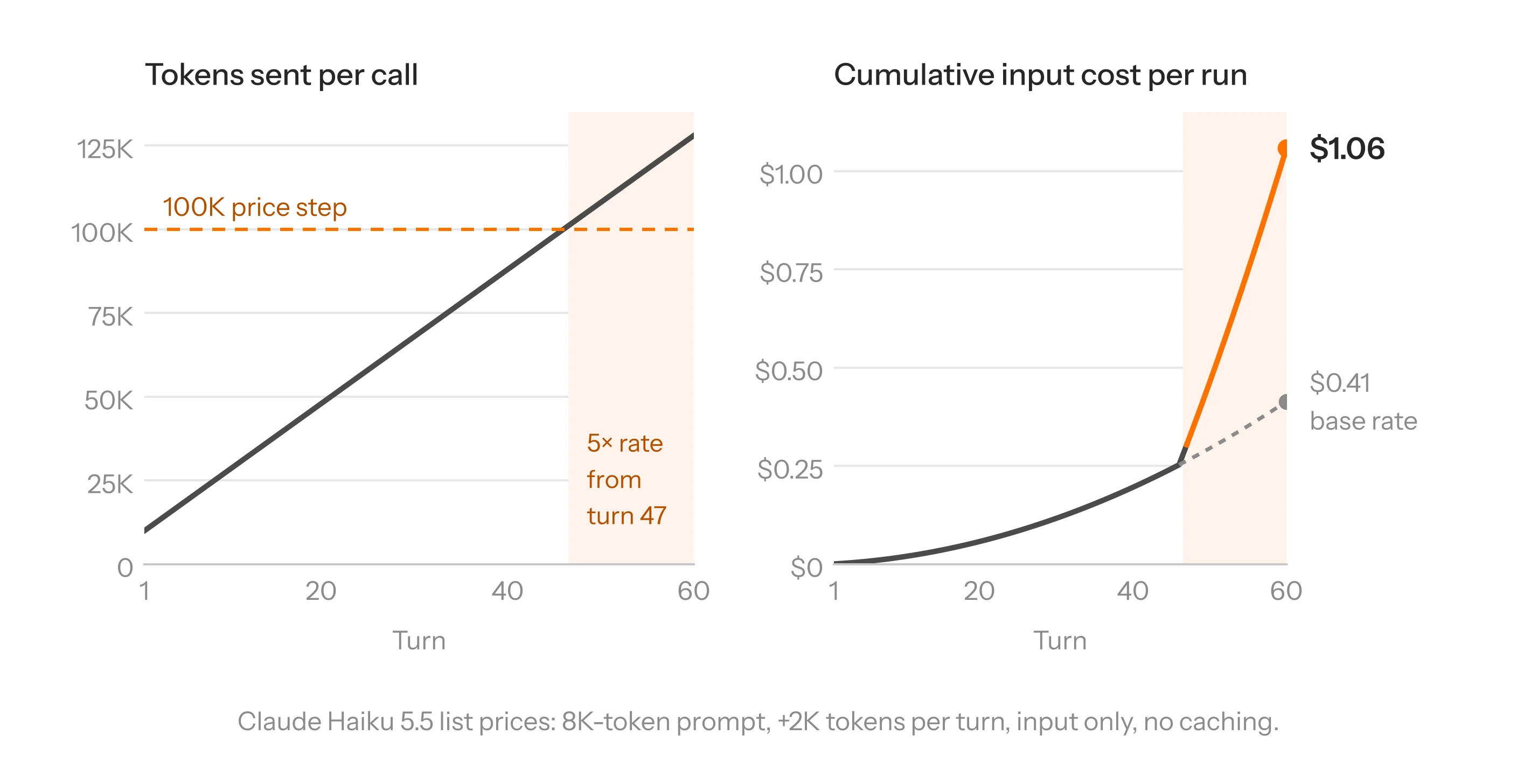
Most agent loops resend the whole conversation on every turn. Turn 1 sends the system prompt and tool definitions, say 8,000 tokens. Turn 2 sends them again, plus everything turn 1 produced, say another 2,000. Each turn pays for every turn before it, so the bill is not ten turns times one turn’s tokens:
| Turn | Tokens sent on this turn | Tokens sent so far |
|---|---|---|
| 1 | 10,000 | 10,000 |
| 5 | 18,000 | 70,000 |
| 10 | 28,000 | 190,000 |
| 20 | 48,000 | 580,000 |
An 8,000-token prompt plus 2,000 new tokens a turn, with no caching. Double the turns and the bill roughly triples: it grows with the square of the turn count.
Pricing tiers steepen the curve. Claude Haiku 5.5 charges $0.10 per million input and $0.50 per million output tokens up to a 100,000-token prompt; above that the whole request is billed at five times the rate, cached tokens included. In the example, context crosses 100,000 at turn 47; by turn 60 the input bill is $1.06 instead of $0.41, and the new tokenizer gets you there sooner. Other providers have steps of their own; find yours before you fix a per-task price.
- Cache the stable prefix. System prompt, tools and reference material first, byte-identical across calls. A cache read costs a tenth of a fresh input token on Haiku 5.5 and a write 25% more, so it pays only when the prefix is reused inside the window. One changed character near the start invalidates everything after it.
- Compact as you go. Summarise older turns, drop tool outputs once used, carry a compact state object instead of the transcript.
- Isolate messy work in sub-agents so the orchestrator sees a five-line conclusion, not fifty pages.
- Control output and reasoning tokens. Output costs five times input on Haiku 5.5, and reasoning bills as output. Structured answers without preamble, capped length, reasoning effort set per step.
Compact too hard and the agent pays for another search. The goal is the cheapest correct answer, not the fewest tokens.
4D. Route each step to the right model
Checking whether a company fits the profile is work for a small model or code; planning and writing the message are where a frontier model earns its price. A cascade tries the small model first and sends the call to the large model only when a validator rejects the small model’s answer. Every call pays the small price; only the escalated ones pay the large price as well. Say the small model costs 1¢ a call and the large one 10¢:
| Share of calls escalated | Cost per call with the cascade | Always use the large model |
|---|---|---|
| 10% | 1¢ + 10% of 10¢ = 2¢ | 10¢ |
| 30% | 1¢ + 3¢ = 4¢ | 10¢ |
| 50% | 1¢ + 5¢ = 6¢ | 10¢ |
| 90% | 1¢ + 9¢ = 10¢ (break-even) | 10¢ |
| 100% | 1¢ + 10¢ = 11¢ (worse) | 10¢ |
With the small model at a tenth of the price, the cascade pays until nine calls in ten escalate. Measure your escalation rate; it decides whether the cascade is a saving or an extra hop.
The risk is a weak validator letting a cheap wrong answer through, which causes an expensive failure three steps later.
4E. Retrieve less, but the right less
Stuffing whole documents into the prompt is among the commonest waste, and poor retrieval shows up later as extra agent steps.
ElectionGPT answers questions about the 2026 Tamil Nadu elections on GPT-OSS-20B and 120B, so retrieval does the heavy lifting: a classifier routes each question or skips retrieval; the query is rewritten into vector and BM25 forms and the results fused; structured affidavit data stays in SQLite and the model writes SQL; aliases live in a lookup table, not the prompt. Most of the work happened offline, which is what lets small models hold up at 6.54 s p50 and 15.39 s p99.
4F. Stop paying twice for the same information
In data-heavy products, lookups can cost more than the model. Cache enrichment results within the freshness window your contracts allow; call providers in order of cost and hit rate and stop at the first verified result, as Bitscale and Origami do; send non-urgent work through batch APIs at half price. Fixing the waterfall can save more than switching models.
4G. Specialise only when volume justifies it
Once a narrow step runs at high volume, a small fine-tuned model can often do it for a fraction of the cost. Intercom moved a high-volume step in its support product off GPT-4.1 onto a fine-tuned 14B Qwen model, avoiding close to $250,000 a month in inference spend.
Checkr picked a fine-tuned Llama 3 8B over GPT-4 for its hardest background-check classifications, at about $800 a month against $7,000–12,000. Harvey cut its cost per analysed cell by 54.8% against Claude Sonnet 5 with a model trained for one legal workflow.
Our own InvoiceIQ Bench shows where savings like these come from, and where they stop. It tests 14 vision models on 494 real invoices; a document passes only if the invoice number, date, VAT and total all match exactly.
| Model | Exact-match accuracy | Cost for 494 invoices | Cost per correct extraction |
|---|---|---|---|
| Gemini 3.1 Pro | 81.4% | $9.74 | ≈$0.024 |
| Gemini 3.7 Flash | 80.6% | $3.00* | ≈$0.0075* |
| InvoiceIQ (fine-tuned 8B) | 80.2% | $0.19** | ≈$0.00048** |
| Claude Sonnet 5 | 78.7% | $3.85 | ≈$0.0099 |
| Claude Opus 5 | 78.5% | $10.66 | ≈$0.027 |
| Kimi K3 | 71.3% | $17.30 | ≈$0.049 |
| GPT-5.6 Sol | 58.9% | $10.44 | ≈$0.036 |
Cost per correct extraction = run cost ÷ invoices extracted correctly, list prices October 2026. * Standard rate; $1.50 on launch pricing. ** One L40S at $2/hour: 345 s of GPU time at 16 concurrent requests.
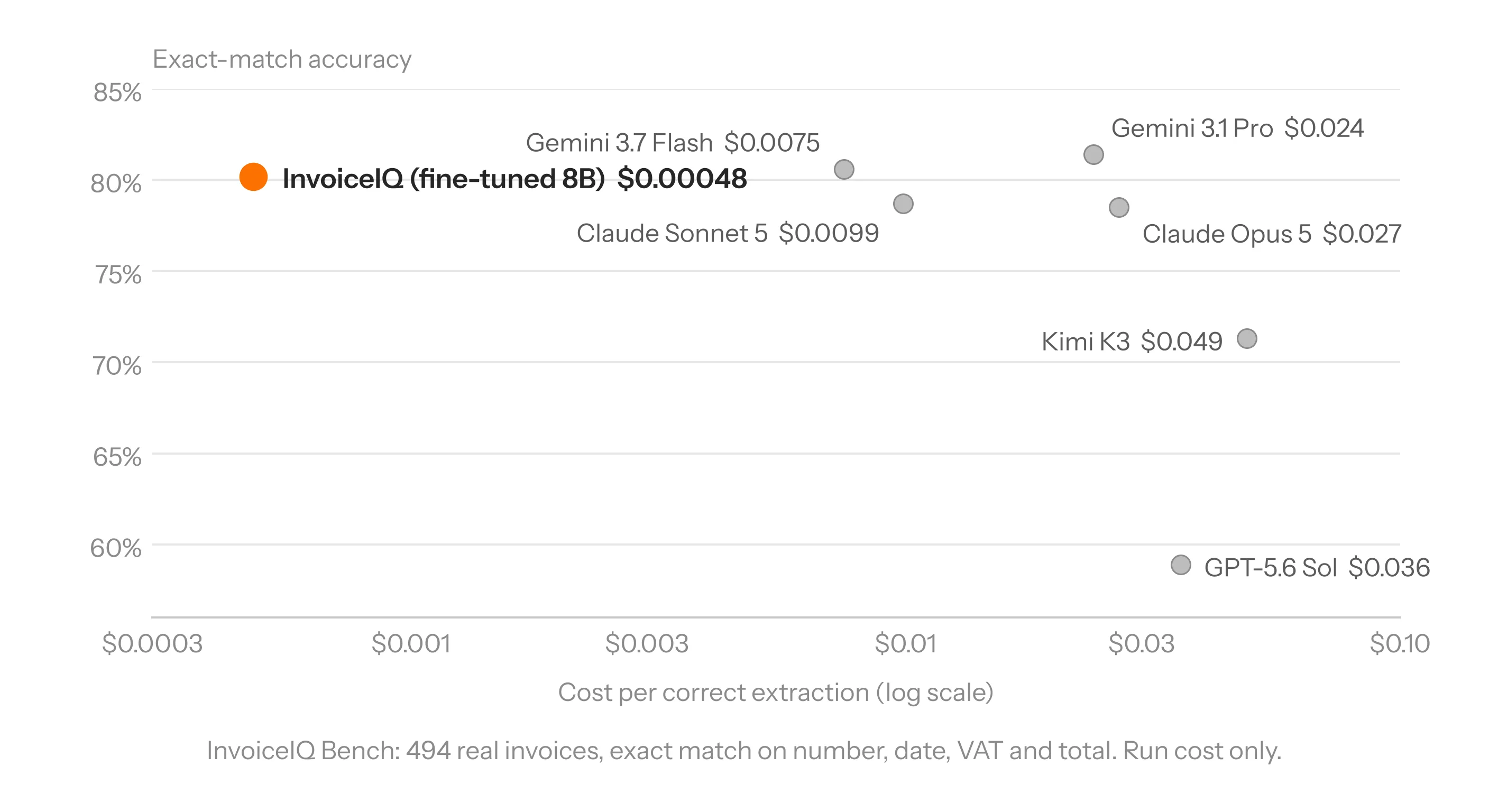
InvoiceIQ, our fine-tune of the open Qwen3-VL 8B, lands 1.2 points behind the leader at about a fiftieth of the cost per correct result. Against the cheapest model that matches it, Gemini 3.7 Flash, the edge is smaller: about 16 times cheaper. Fine-tuning on 8,500 labelled documents took the base model from 48% to 80%, tested on invoices it never saw in training.
The GPU cost only holds while the GPU is busy. A self-hosted model is a fixed cost pretending to be a variable one. InvoiceIQ needs 19.4 GPU-hours per 100,000 invoices; what you pay depends on utilisation:
| GPU utilisation | Cost per 100k invoices | Per invoice | vs Gemini 3.1 Pro ($1,971 / 100k) | vs Gemini 3.7 Flash ($607) |
|---|---|---|---|---|
| 100% busy | $39 | $0.0004 | 51× cheaper | 16× cheaper |
| 50% busy | $78 | $0.0008 | 25× | 8× |
| 10% busy | $388 | $0.0039 | 5× | 1.6× |
| Always on, 100k a month (2.7% busy) | $1,460 | $0.0146 | 1.35× | Flash is 2.4× cheaper |
One L40S at $2/hour. Gemini costs from the same benchmark run at list prices; Flash at its standard rate.
An always-on GPU only beats Gemini 3.1 Pro above about 74,000 invoices a month, and Gemini 3.7 Flash above about 240,000. Below that, the API is cheaper, even before you count labelling, training and engineering time. That is the honest shape of specialisation: a huge edge over the model you’d pick for accuracy, a smaller one over the cheapest model that’s good enough, and only once volume covers the fixed cost.
Shopify found the same in production: a fine-tuned Qwen3-32B behind Flow is 68% cheaper and 2.2x faster than the closed model it replaced. The first deployment matched offline benchmarks yet activated 35% fewer workflows with real merchants, until a production feedback loop closed the gap in two weeks. Specialise last. Owning a model means owning that loop.
4H. Close the loop
Every technique above is a one-off unless something keeps applying it. Feed failures and runs above the p95 into the eval set weekly. Fix the cheapest lever first (a wandering prompt, a tool that returns too much, a cautious routing threshold); retrain on production data last, as Shopify did and as Coinbase did with an open 9B model on its own fraud data.
Ship only when cost per successful outcome falls without the pass rate dropping on the hardest cases, re-run the set whenever a provider updates a model you depend on, and use customer data for training only where contracts allow.
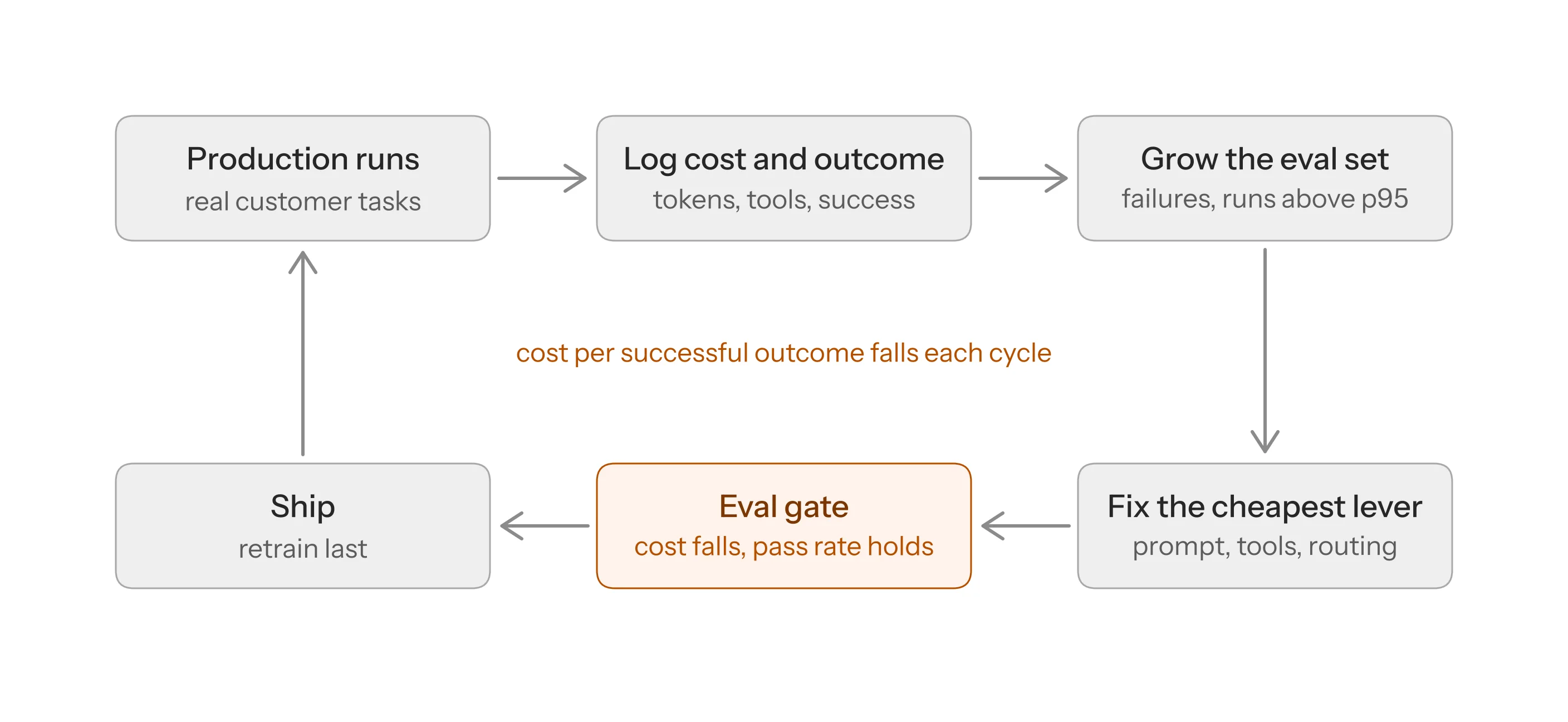
Order of work: measure; fix the harness and token use; route; fix retrieval and reuse; specialise last. Start the loop on day one, even if all it does is grow your eval set.

5. Turn real costs into credit prices
Start from measured costs, not a competitor’s credit price. For an illustrative research platform:
| Task | Mean delivery cost | p95 delivery cost |
|---|---|---|
| Quick lookup | $0.01 | $0.02 |
| Research run | $0.05 | $0.12 |
Price per task = mean cost per successful task ÷ (1 − target gross margin)
At a 50% target margin a lookup prices at $0.02 and a research run at $0.10: with a credit worth $0.01 of usage, 2 credits and 10 credits.
- Charge a flat price per task. The fix for the run that eats 60 credits: 10 credits every time, with you carrying the variance. A p95 run at $0.12 loses money, which is fine while the mix is stable. Two guardrails: the step and token cap from 4B, and a weekly check that the mean hasn’t drifted. If a task’s tail is too wide, split it into tiers.
- Size plans from real usage. A typical customer running 250 research runs and 500 lookups a month uses 3,500 credits, so a $49 plan with 4,000 gives headroom. Those credits cost $17.50 to deliver; add $4 of attributable infrastructure and the margin is about 56%. Model it by segment and cohort.
- Treat breakage as upside, not the plan. Unused credits are real margin, and some bigger-allowance competitors count on them. Automation, heavy users and rollover erode it. At the full 4,000 credits this plan still makes about 51%.
- The cost-based price is the floor, not the price. $0.10 protects your margin on a run that saves a salesperson 20 minutes; it says nothing about what they’d pay. Decide how much of that gap to capture and how much to give back.
6. Choose how you want to beat competitors
Say section 4 cuts a research run from $0.05 to $0.035 with no loss in quality. Four ways to spend a 30% saving:
- More for the same price. About 43% more work at the same margin (1 ÷ 0.7): 140 runs for $49 where a competitor offers 100. Advertise the runs, not a bigger credit balance.
- A lower entry price, if acquisition and retention cover the lower revenue per account.
- A better product at the same price: coverage, accuracy, speed, integrations, and a premium where reliability matters more than volume.
- A better margin, to fund distribution, sales or product.
Efficiency creates the option. Pricing strategy decides whether it becomes more customers, better retention or more profit.
7. Predictable pricing is an advantage in its own right
A user expects a task to cost 10 credits; the agent retries and burns 60. Next time they hesitate before clicking Run, then start rationing. Customers who ration get less value from a product they already pay for. On June 1, 2026 GitHub Copilot moved from premium requests to AI Credits metered by tokens at each model’s API rates; base prices didn’t change, but each request’s cost now depended on the model and the conversation length. One Pro+ subscriber quoted by The Register used about 8% of a month’s credits in two hours.
Customers shouldn’t need to understand your architecture to predict their bill. Each of these designs builds that trust, and each is affordable only when your cost per outcome is low and stable:
| Design choice | What the user gets | What it requires underneath |
|---|---|---|
| Credits defined by outcome | They can do the maths themselves | A stable cost per outcome |
| An estimate before every action | No surprises | Low variance per task type |
| Charge only on success | No paying for failures | A low failure and retry rate |
| Rollover of unused credits | No use-it-or-lose-it pressure | Margin headroom for banked credits |
| Spending caps and alerts | A known worst case | Real-time metering |
| One price per task, however many steps | Predictability | Enough margin to absorb outliers |
Intercom’s Fin charges $0.99 per outcome however many actions its agent takes. Origami charges only for emails it actually finds. Bitscale charges nothing for failed lookups or agent reasoning, pauses workflows with alerts at 80% and 100% of usage, and rolls unused credits over up to three times the monthly limit.
Three packaging rules. Before product–market fit, sell a simple subscription with a generous allowance and log cost per task from day one; charge per outcome only once success is measured reliably. Price heavy users, don’t punish them: measure cost per account, cap runaway loops rather than normal use, sell committed volume, or allow bring-your-own-key as Warp and Zed do. And when you change pricing, do the one thing GitHub got right: show each customer what it means for their real usage a month before it applies, ship caps and alerts with it, and put some of your savings into the new plans.
8. The moat is a head start
Any single optimisation can be copied. What takes time to copy is the loop and the data behind it. A team that has turned months of production runs into eval cases, routing rules and training data starts every quarter ahead; a competitor beginning today has to collect the same data first. If your cost per outcome falls quarter after quarter, you can price towards where costs are going and repeat “more for the same price” instead of doing it once.
The bottom line
The next time a competitor offers 25% more credits for the same price, don’t copy their pricing page. Find out what their credits buy, what it costs you to deliver the same outcome, and what that outcome is worth to the customer. If your costs are too high, fix the system. If your value is higher, say so. If your costs are lower, decide how much of the advantage to give away and how much to keep.

FAQ
Should AI features be priced per token, per credit or per outcome?
Per credit, with each credit a fixed price for a named task, is the default: it tracks your variable cost without exposing customers to your architecture. Per-token pricing pushes your variance onto the customer. Per-outcome pricing is the best customer experience but moves execution risk onto you; adopt it once your failure rate is low and your cost per outcome is stable.
How do we decide what one AI credit is worth?
Work backwards from measured mean cost per successful task and your target gross margin (section 5), then pick a denomination that makes common tasks round numbers. Keep the per-task credit price flat even though real cost varies; step and token caps are what make that safe.
What gross margin should an AI SaaS product target?
The 2026 survey median is about 50%, and only 12% of companies aim for SaaS-style 80%+. Design for 50% as the floor and use section 4 to climb. Model it per segment: heavy users and expensive task types change the answer.
How can we reduce AI agent costs without hurting quality?
Start with the harness: the loop, the tools, the state, the stopping rules. It’s usually where the waste is. Then treat tokens as a budget: cache the stable prefix, compact as you go, isolate messy work in sub-agents and design tools to return less. Route each step to the right model, and specialise last. The goal is the cheapest correct answer, not the fewest tokens. We go deeper in Reduce AI agent token costs with better harness design.
When should we fine-tune our own model instead of using an API?
Last. Only for a narrow, high-volume step with a reliable pass/fail signal, thousands of labelled production examples, and enough volume to keep a GPU busy. A self-hosted model is a fixed cost pretending to be a variable one: in the InvoiceIQ example it beats the top frontier model above about 74,000 documents a month, but only beats the cheapest capable one above about 240,000. Below that, use the API and spend the effort on the harness.